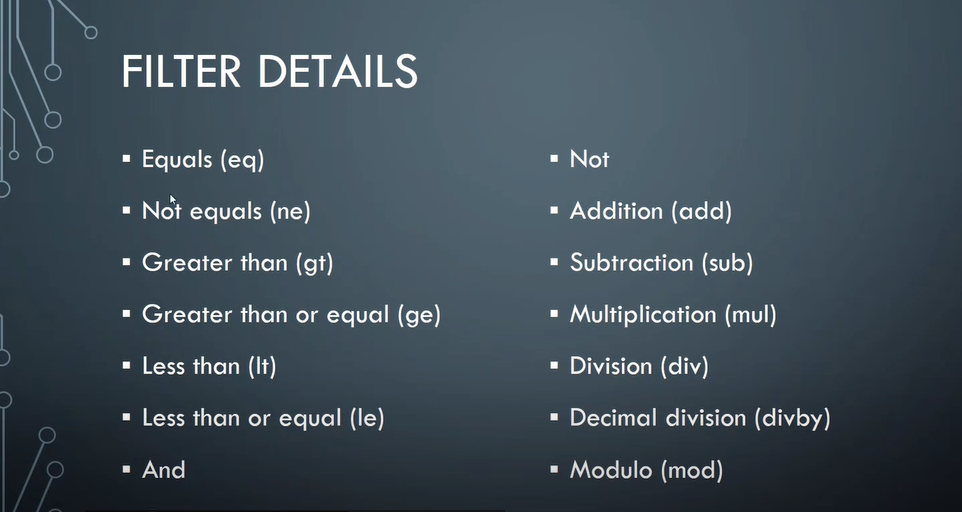
Add a custom template to export Expense journals to Excel. All operations(create,update,delete) needs to be done using opening excel and viceversa.
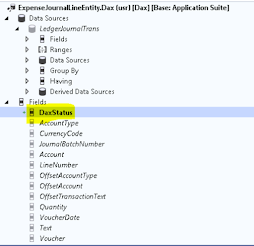
Instead of creating a new entity, I have duplicated the entity which was previously used for export and made changes. Now this is my custom entity.

Create a class :
Take the extension of form where custom template needs to be available.
using Microsoft.Dynamics.Platform.Integration.Office;
using Microsoft.Dynamics.Platform.Integration.Office.FilterBinaryNode;
[ExtensionOf(formStr(LedgerJournalTransCost))]
internal final class DaxLedgerJournalTransCost_Extension
{
[FormEventHandler(formStr(LedgerJournalTransCost), FormEventType::Initializing)]
public static void ComponentSalesMasterListPage_OnInitializing(xFormRun sender, FormEventArgs e)
{
const str CustomExportTHSSalesMasterToExcelOptionId = "Dax Custom entity export";
FormRun formRun = sender as FormRun;
if (formRun)
{
OfficeFormRunHelper officeHelper = formRun.officeHelper();
if (officeHelper)
{
officeHelper.OfficeMenuInitializing += eventhandler(DaxLedgerJournalTransCost_Extension::officeMenuInitializingHandler);
}
}
}
private static void officeMenuInitializingHandler(FormRun formRun, OfficeMenuEventArgs eventArgs)
{
const str CustomExportLinesToExcelOptionId = "Dax Custom entity export";
OfficeMenuOptions menuOptions = eventArgs.menuOptions();
// Find the entity options if they were included by default
OfficeMenuDataEntityOptions entityOptions = menuOptions.getOptionsForEntity(tableStr(DaxExpenseJournalLineEntity));
if (!entityOptions)
{
// The entity options were not included. Add them.
entityOptions = OfficeMenuDataEntityOptions::construct(tableStr(DaxExpenseJournalLineEntity));
menuOptions.dataEntityOptions().addEnd(entityOptions);
}
OfficeGeneratedExportMenuItem salesMasterMenuItem = OfficeGeneratedExportMenuItem::construct(tableStr(DaxExpenseJournalLineEntity),CustomExportLinesToExcelOptionId);
salesMasterMenuItem.displayName('Dax Custom entity export');
salesMasterMenuItem.getDataEntityContext += eventhandler(DaxLedgerJournalTransCost_Extension::getDataEntityContextHandler);
menuOptions.customMenuItems().addEnd(salesMasterMenuItem);
entityOptions = OfficeMenuDataEntityOptions::construct(tableStr(DaxExpenseJournalLineEntity));
eventArgs.menuOptions().dataEntityOptions().addEnd(entityOptions);
}
private static void getDataEntityContextHandler(OfficeGeneratedExportMenuItem _menuItem, FormRun formRun, ExportToExcelDataEntityContext dataEntityContext)
{
ExportToExcelDataEntityContext context = dataEntityContext;
const str CustomExportLinesToExcelOptionId = 'Dax Custom entity export';
LedgerJournalTrans ledgerJournalTrans = formRun.dataSource(formDataSourceStr(LedgerJournalTransCost, LedgerJournalTrans)).cursor();
if (_menuItem.id() == CustomExportLinesToExcelOptionId )
{
context.addEntityDefault(tableStr(DaxExpenseJournalLineEntity));
ListEnumerator enumerator = context.entities().getEnumerator();
while (enumerator.moveNext())
{
ExportToExcelDataEntityInfo entity = enumerator.current();
if (entity.entityName() == tableStr(DaxExpenseJournalLineEntity))
{
ExportToExcelFilterTreeBuilder filterBuilder = new ExportToExcelFilterTreeBuilder(tableStr(DaxExpenseJournalLineEntity));
FilterNode filterExpression = filterBuilder.areEqual(fieldStr(DaxExpenseJournalLineEntity, JournalBatchNumber), ledgerJournalTrans.JournalNum);
entity.filter(filterExpression);
//FilterNode filterExpression1 = filterBuilder.areEqual(fieldStr(DaxExpenseJournalLineEntity, DataareaId), curExt() ); // entity.filter(filterExpression);
//FilterCollectionNode collectionNode = new FilterCollectionNode();
//collectionNode.Operator = Microsoft.Dynamics.Platform.Integration.Office.FilterOperators::And;
//var collection = collectionNode.Collection;
//if (ledgerJournalTrans.JournalNum)
//{
// collection.Add(filterExpression);
//}
//if (ledgerJournalTrans.DataAreaId == 'USMF')
//{
// collection.Add(filterExpression1);
//}
//entity.filter(collectionNode);
}
}
}
}
}
..................
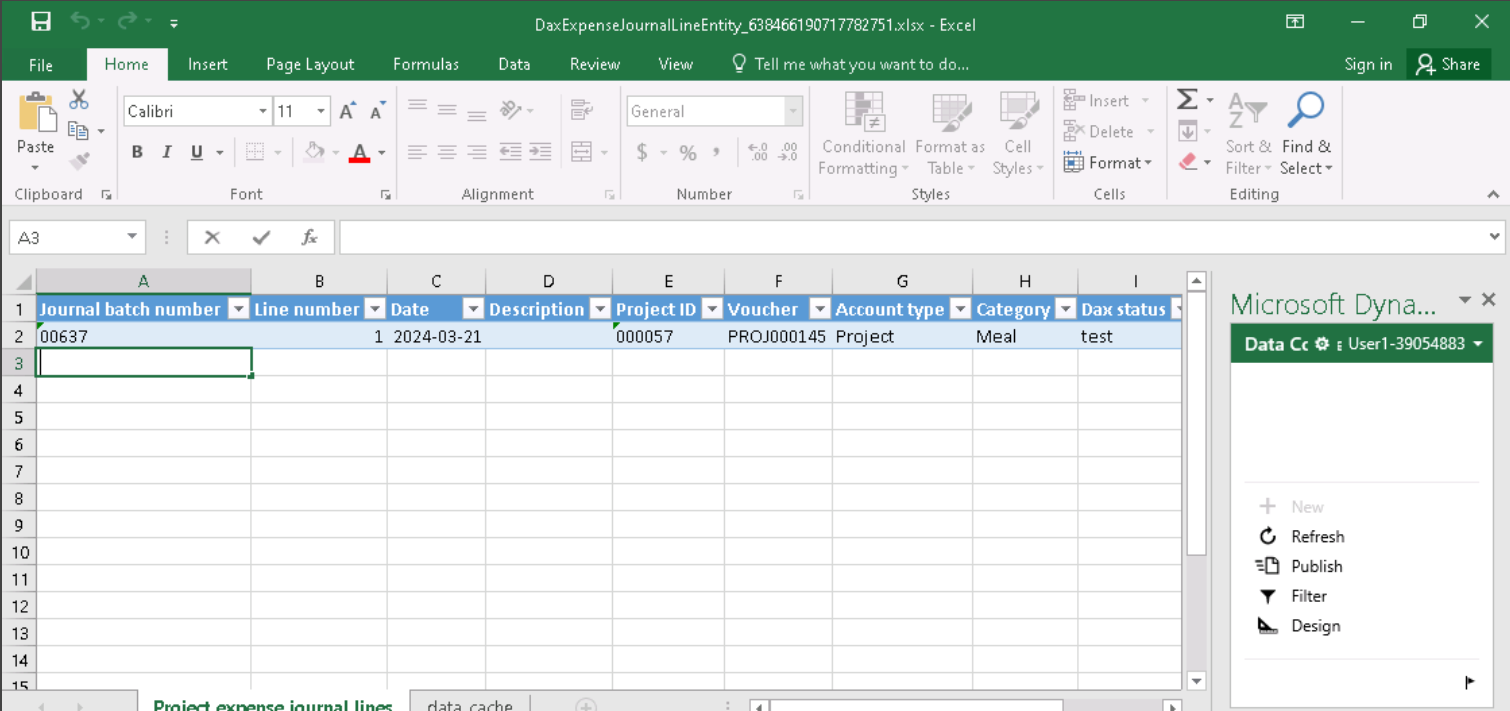
After build, our template is added to form.

Click on our custom template then lines will be exported.




using Microsoft.Dynamics.Platform.Integration.Office;
class DaxExpenseJournalClass extends DocuTemplateRegistrationBase implements LedgerIJournalExcelTemplate
{
// resource that contains xlsx file.
private const DocuTemplateName ExcelTemplateName = resourceStr(DaxExpenseJournal);
// lines Data Entity
private const EntityName LineEntityName = tableStr(ExpenseJournalLineEntity);
private const FieldName LineEntityJournalNum = fieldStr(ExpenseJournalLineEntity, JournalBatchNumber);
private const FieldName LineEntityDataAreaId = fieldStr(ExpenseJournalLineEntity, dataAreaId);
private const FieldName HeaderEntityName = tableStr(ExpenseJournalHeaderEntity);
private const FieldName HeaderEntityJournalNum = fieldStr(ExpenseJournalHeaderEntity, JournalBatchNumber);
// header Data Entity.
private const FieldName HeaderEntityDataAreaId = fieldStr(ExpenseJournalHeaderEntity, dataAreaId);
public void registerTemplates()
{
this.addTemplate(OfficeAppApplicationType::Excel,
ExcelTemplateName,
ExcelTemplateName,
"Dax Expense Journal",
"Dax Expense Journal",
NoYes::No,
NoYes::No);
}
public boolean isJournalTypeSupported(LedgerJournalType _ledgerJournalType)
{
// only daily journals are supported in this template.
return _ledgerJournalType == LedgerJournalType::Cost;
}
public DocuTemplateName documentTemplateName()
{
return ExcelTemplateName;
}
public Set supportedAccountTypes()
{
// Set with supported account types.
Set accountSetTypes = new Set(Types::Integer);
accountSetTypes.add(LedgerJournalACType::Project);
accountSetTypes.add(LedgerJournalACType::Ledger);
return accountSetTypes;
}
public Set supportedOffsetAccountTypes()
{
// Set with supported offset account types.
Set offsetAccountTypeSet = new Set(Types::Integer);
offsetAccountTypeSet.add(LedgerJournalACType::Ledger);
return offsetAccountTypeSet;
}
public boolean validateJournalForTemplate(LedgerJournalTable _ledgerJournalTable)
{
return LedgerJournalExcelTemplate::validateJournalForTemplate(_ledgerJournalTable, this);
}
public EntityName headerEntityName()
{
return HeaderEntityName;
}
public EntityName lineEntityName()
{
return LineEntityName;
}
public FieldName headerJournalBatchNumberFieldName()
{
return HeaderEntityJournalNum;
}
public FieldName headerDataAreaFieldName()
{
return HeaderEntityDataAreaId;
}
public FieldName lineJournalBatchNumberFieldName()
{
return LineEntityJournalNum;
}
public FieldName lineDataAreaFieldName()
{
return LineEntityDataAreaId;
}
public FilterCollectionNode appendHeaderEntityFilters(FilterCollectionNode _headerFilter, ExportToExcelFilterTreeBuilder _headerFilterBuilder)
{
return _headerFilter;
}
/// <summary>
/// Filter the vouchers which are having accounttype as Project and offset account as Ledger
/// </summary>
/// <param name = "_lineFilter"></param>
/// <param name = "_lineFilterBuilder"></param>
/// <returns></returns>
public FilterCollectionNode appendLineEntityFilters(FilterCollectionNode _lineFilter, ExportToExcelFilterTreeBuilder _lineFilterBuilder)
{
// creates excel filter to show only lines that have Bank account type
// and Ledger offset account type
FilterCollectionNode lineFilter = _lineFilterBuilder.and(
_lineFilterBuilder.areEqual(fieldStr(ExpenseJournalLineEntity, AccountType), LedgerJournalACType::Project),
_lineFilterBuilder.areEqual(fieldStr(ExpenseJournalLineEntity, OffsetAccountType), LedgerJournalACType::Ledger));
return _lineFilterBuilder.and(_lineFilter, lineFilter);
}
public void applyCustomTrimming(Excel.IWorkbookManager _templateManaer, Excel.WorkbookSettingsManager _settingsManager, LedgerJournalTable _ledgerJournalTable)
{
}
}
.....................
A custom template is added to form.


public static void main(Args _args)
{
XmlDocument responseDoc;
XmlNodeList data;
XmlElement nodeData,payment_Indicator,payment_Date,uniqueCustRefNo,debitAccountNo,nameofBeneficiary,
vendorBeneficiaryCode,beneficiaryBankAcNo,beneficiaryBankIFSCCode,instrumentAmount,
remarks,txnStatus,txnUTR,txnREMARK,txnProsDate;
//#define.filename(@'C:\Temp\sales.xml')//ToDO: File name to be given
#define.filename(@'E:\Response\05032024_113245_INVEST_INDIA_RES.xml')//ToDO: File name to be given
responseDoc = XmlDocument::newFile(#filename);
data = responseDoc.selectNodes('//'+"Data");
nodeData = data.nextNode();
try
{
ttsbegin;
while(nodeData)
{
payment_Indicator = nodeData.selectSingleNode("Payment_Indicator");
payment_Date = nodeData.selectSingleNode("Payment_Date");
uniqueCustRefNo = nodeData.selectSingleNode("UniqueCustRefNo");
debitAccountNo = nodeData.selectSingleNode("DebitAccountNo");
nameofBeneficiary = nodeData.selectSingleNode("NameofBeneficiary");
vendorBeneficiaryCode = nodeData.selectSingleNode("VendorBeneficiaryCode");
beneficiaryBankAcNo = nodeData.selectSingleNode("BeneficiaryBankAcNo");
beneficiaryBankIFSCCode = nodeData.selectSingleNode("BeneficiaryBankIFSCCode");
instrumentAmount = nodeData.selectSingleNode("InstrumentAmount");
remarks = nodeData.selectSingleNode("Remarks");
txnStatus = nodeData.selectSingleNode("TxnStatus");
txnUTR = nodeData.selectSingleNode("TxnUTR");
txnREMARK = nodeData.selectSingleNode("TxnREMARK");
txnProsDate = nodeData.selectSingleNode("TxnProsDate");
nodeData = data.nextNode();
}
ttscommit;
//Info("File is processed");
info(strFmt("%1,%2,%3,%4",payment_Indicator.text(),payment_Date.text(),uniqueCustRefNo.text(),debitAccountNo.text()));
}
catch (Exception::Error)
{
Throw (Exception::Error);
}
}
.....................